
➡️ Please Note: Some features might not be visible to you based on your access levels and permissions.
Watch the short video to get a feel for how it all looks in action and what you can expect when using Alkimii on your mobile ▶️ Alkimii on Mobile
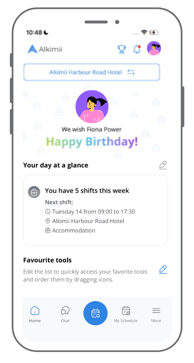
Birthday Widget
|
 |
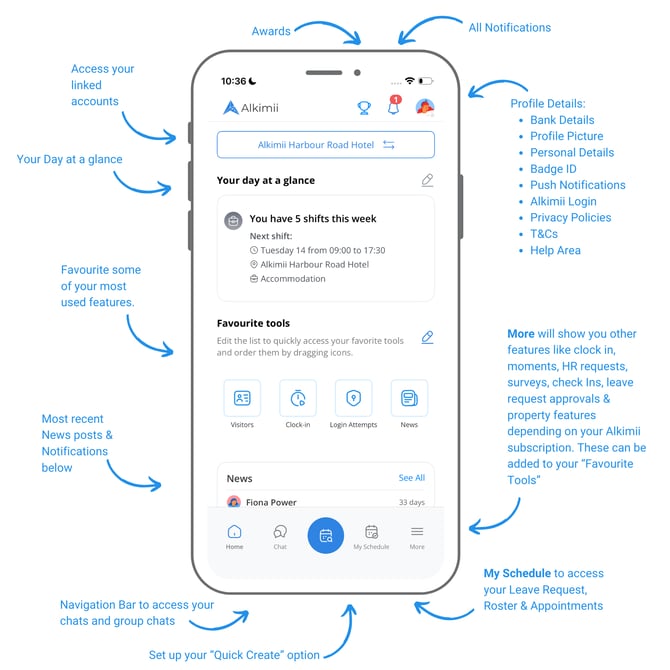
Your Day at a Glance
Your Day at a Glance lets you personalise your home screen so you see what matters most to you the moment you open the app.
When setting up or editing your Day at a Glance, simply toggle on the areas you'd like to see, such as your clock-in status, upcoming shifts, leave balances, Moments, and more. Tap "Choose fields" to confirm your selection.
You can return to this at any time to add, remove, or reorder your widgets to suit the way you work.
👉 Please Note: The options available to you will depend on your access level and your property's Alkimii subscription.
For more information about Your Day at a Glance, see our help article 👉 Your Day at a Glance - Mobile App
Favourite Tools
Placing favourite tools on the homepage streamlines your experience, allowing you to access commonly used tools with just one click. This reduces the time and effort spent navigating through menus and different areas of the app.
Currently (depending on your access and subscription with Alkimii) you will be able to add a combination of these tools for quicker access.
For more information about Favourite Tools, click here!
News
View the latest updates on your site at a glance with the News widget, which displays four most recent posts for your site. To explore the full newsfeed, simply click "See All" and access your complete news centre.
For more information about News, see our help article 👉 News Posts on Mobile
Notifications
Stay on top of important updates with the Notifications widget, positioned just below News. Instantly view your most recent notifications to ensure you never miss key information like break notifications, shift updates, chat mentions and more. For a complete overview, tap the notification bell in the top right to access your full list, helping you stay informed.
For more information about Notifications, see our help article 👉 My Settings - Notifications
Chat
Enjoy instant and real-time communication, whether you're seeking quick answers, collaborating with team members, or participating in community discussions. The convenience of chat extends to its accessibility on the go, ensuring you stay connected at all times without the need for app switching. This feature is particularly useful for professional settings, offering a seamless channel for sharing updates, ideas, and feedback. With notification capabilities, personalized settings, and the ability to share multimedia content, our chat feature is designed to provide a dynamic, engaging, and user-centric experience.
For more information on navigating Chat, click here!
Profile
In the profile section, you hold the power to effortlessly update your personal details and manage your bank information. Dive into essential information, including your badge ID and insights into Alkimii's policies and terms. Seamlessly update your email address or explore our comprehensive help area, where you can find extensive support and guidance on utilizing the various features within Alkimii. It's your hub for personalized management and assistance, ensuring you have the information and tools you need at your fingertips.
For more information on navigating the Profile area, click here!
Quick Create Action Button
The Quick Create button gives you instant access to the feature you use most. Each customer can choose one option to set as their quick action, such as Shift Notes, Clock In/Out, Maintenance Task and Preventive, Visitors, Suppliers, Leave Requests, or Roster.
👉 These options available may vary depending on your Alkimii subscription.
My Schedule
Here's your dedicated space to effortlessly access your upcoming week's roster or submit time-off requests. Easily track your holiday balances, including bank holidays, and seamlessly request leave—all conveniently consolidated in one area. Stay informed about the status of your requests by viewing approvals or pending actions for quick reference. It's your go-to hub for managing your schedule and time-off requests with ease.
Use our quick links for more information on these areas.
More..
Currently (depending on your access and subscription with Alkimii) you will be able to see the following tools which can be added to the favourite tools area of the homepage.
Use our quick links for more information on these areas.