
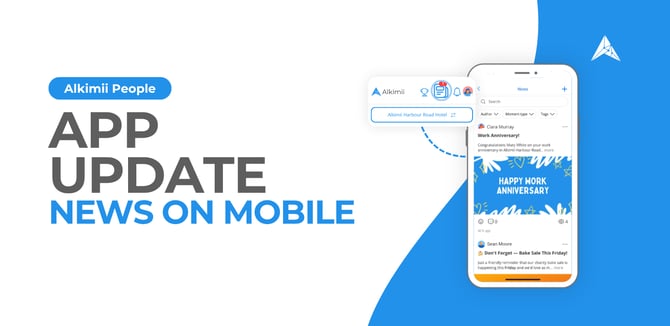
News on Mobile!
We're excited to announce that News is now easier to reach on the Alkimii mobile app!
The News icon now appears right at the top of your mobile homepage, sitting between Awards and Notifications, mirroring the layout you already know from the web. Staying up to date with your team has never been quicker.
How it helps
With News now a single tap away, your team can stay in the loop on everything happening across the business, straight from their phone. It keeps everyone connected and informed, wherever they are.
What's new
Quick access: The News icon now lives at the top of the mobile homepage, between Awards and Notifications
Familiar layout: The mobile view mirrors the web, so it feels instantly recognisable
Stay connected: Keep up with team news and company updates on the go
Want to get the most out of News on mobile?
Learn how to use News on mobile here, find out more about navigating the mobile app here, and explore more mobile tips in Alkimii Mobile Essentials on the Academy.
Need more help?
Email hello@alkimii.com and our Customer Success team will be happy to help.
Product: People
-4.png?width=670&height=327&name=Announcements%20(1)-4.png)
Property Update: AI Proactive Maintenance and More
We're excited to announce AI Proactive Maintenance, the latest addition to Alkimii Property, now rolling out on a phased basis!
AI Proactive Maintenance lets you set up recurring checks for your property, like daily fire door checks or weekly balcony inspections. Once set up, the system creates these checks automatically, and your team completes them on mobile with photo-guided tasks, so nothing gets missed.
How it helps
Routine inspections happen on time, every time, without anyone having to remember them. Your team works through each checklist on their phone, and the app tells them exactly what to take a picture of at each step. Alkimii's AI then reviews the photos, flags potential issues, and suggests tasks that can be created on the spot. Less admin, fewer missed checks, and problems caught before they grow.
What's new
- AI Proactive Maintenance: Build recurring inspections with your own areas and tasks, set the frequency, and track progress and Health Score from the web app
- Photo-guided checks on mobile: Your team is prompted to take a photo for each task, working through inspections area by area, like Doors and Windows or Electrical and Lighting
- AI issue detection: After each section, AI reviews the photos and lists any issues it spots. Edit the suggested task title, create the task in one tap, or add your own manually
Property updates
- AI Maintenance: A reminder that you can also log one-off issues in seconds using photo or voice, with AI drafting the task for you
- New Dashboard: Your Property dashboard is now customisable, so you can arrange it to suit how your site works
- Multi NFCs: As previously announced, a single NFC tag can now be linked to multiple checklists. Scan a tag and simply choose which checklist to complete.
Learn how to create and manage AI Proactive Maintenance here, and how to complete inspections on mobile here. For logging one-off issues, check out our AI Maintenance article here.
These features are included in the subscription for customers using Alkimii Property. If you don't have Alkimii Property, find out more here.
Need more help?
Email hello@alkimii.com and our Customer Success team will be happy to help.
Product: Property
-1.png?width=670&height=327&name=Announcements%20(2)-1.png)
Shift Swapping Beta
We're excited to announce that Shift Swapping is now available in beta in Alkimii!
Give your team the flexibility to manage their own schedules without taking control away from management. Employees can now request to swap shifts with colleagues directly from the mobile app, with a two-step approval process that keeps managers firmly in control of the roster.
How it helps:
Shift swaps happen, and now they can be handled quickly and cleanly. Employees sort it between themselves, managers review and confirm, and the roster stays accurate with no more last-minute messages or manual changes.
What's new:
- Employee-led requests: Employees select a colleague in their department and request a swap in seconds
- Double approval: The colleague responds first, then the manager reviews and confirms
- Full visibility: Pending swaps appear clearly on the shift view so nothing gets missed
- Manager control: Only enabled for the properties and teams where it makes sense
Learn how to approve shift swaps on desktop here and on mobile here.
Spaces in the beta are limited, so get in touch soon to secure your spot.
Contact our Customer Success team at hello@alkimii.com to enable shift swapping for your site.
Product: People
New Course: Setting Up Productivity Standards in Alkimii
A new course is now live in Alkimii Academy!
Learn how to set clear, data-driven staffing levels for departments or job titles in your site, linked directly to your forecasted demand. This course walks you through building your first productivity standard from start to finish.
How it helps
Productivity standards take the guesswork out of rostering. Instead of relying on habit, you set staffing levels tied to real demand signals like expected revenue, arrivals, or departures. The result is the right people in place at the right time, supporting a more efficient, better staffed operation across your site.
What you'll learn
- The difference between Fixed and Variable Standards
- How to create your first Productivity Standard
- Find and Manage your Productivity Standards
- Navigate the Productivity Dashboard
Start the course here.
If you haven't registered for the Alkimii Academy yet, it's free. Sign up here.
Need more help? Email academy@alkimii.com and our team will be happy to help.
Product: Alkimii Academy
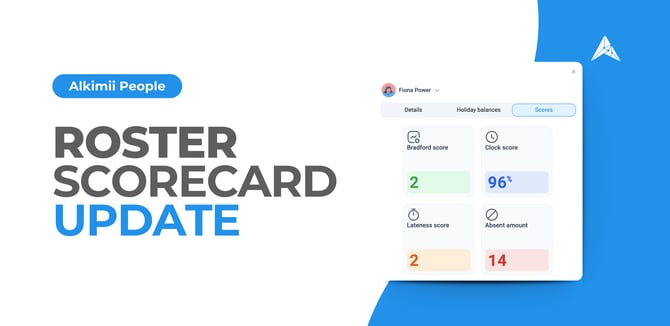
Roster Scorecard
We're excited to announce that the Roster Scorecard is now live in Alkimii.
The metrics you need to manage your team are now available directly on the roster. Click an employee reporting to you and their key details appear in a widget, right where you need them, no need to go looking elsewhere.
How it helps
No more jumping between screens to check how someone is performing. The information you rely on when reviewing your staff is now a single click away, so you can make faster, better-informed rostering decisions without losing your place.
What's new
- Scorecard on the roster: Click any employee on the roster to open their scorecard widget instantly
- Key metrics at a glance: See Bradford score, Clock score, Lateness score, Absent amount and Check ins together in one view
- Personalised to your team: You will only see the scorecard for staff who report to you, keeping it focused on the people you are directly responsible for
- No navigation needed: Everything stays on the roster, keeping you in the flow while you plan
You can learn more here.
Need more help?
Email hello@alkimii.com and our Customer Success team will be happy to help.
Product: People
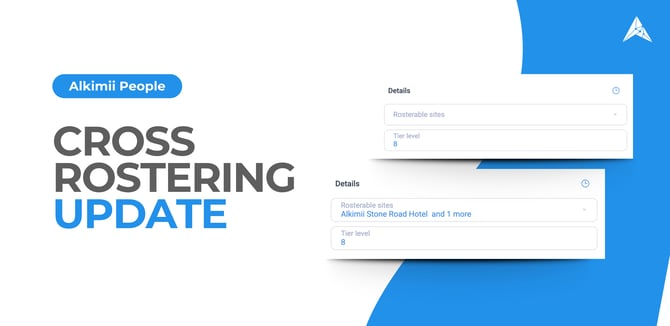
Cross-Site Rostering
We're excited to announce an update to Cross-Site Rostering: you can now assign an employee to multiple locations directly from the staff profile.
How it helps
It now only takes a moment to choose exactly which sites a team member can appear on when building the roster. Once set, they'll show up as available on those other sites' rosters too.
What's new
-
Multi-site selection: Use the multi-select dropdown to choose every site a team member can be rostered into.
-
Appear across rosters: Once selected, the team member becomes available as an option to be cross rostered into those other site rosters.
-
One place to manage it: Set this up in the Rostering section under Staff Profile, alongside tier levels, shift roles, and break rules.
Learn how to manage rostering settings here.
Need more help? Email hello@alkimii.com and our Customer Success team will be happy to help.
Product: People
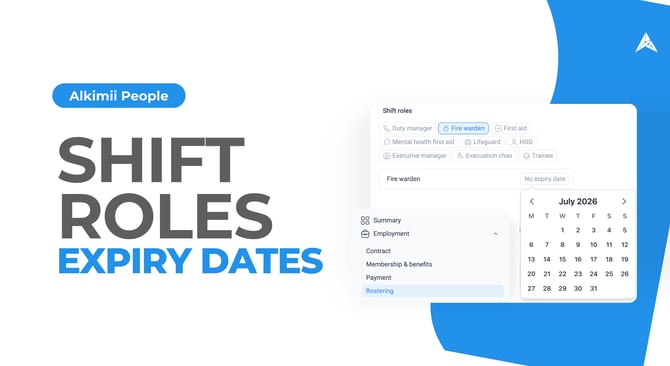 Shift Role Expiry Dates
We're excited to announce that you can now add expiry dates to Shift Roles in Alkimii!
Roles like Fire Warden and First Aid often come with certifications that need renewing. You can now set an optional expiry date against these roles, so you always know when cover is about to lapse.
How it helps
Certifications expire, and it's easy to lose track of when. Now Alkimii does the watching for you. When you roster an employee whose role is close to expiring, you'll see a clear warning, giving you time to arrange renewal or adjust cover before it becomes a problem. Less chasing, fewer gaps, and peace of mind that your safety cover is always valid.
What's new
- Optional expiry dates: Add an expiry date to roles like Fire Warden and First Aid, or leave it off where it's not needed.
- Rostering warnings: Get a clear notification while rostering when an employee's role is expiring, so nothing slips through.
- Stay ahead of renewals: Spot lapsing certifications early and keep your safety cover up to date.
Learn how to add expiry dates to Shift Roles here.
Need more help?
Email hello@alkimii.com and our Customer Success team will be happy to help.
Product: People
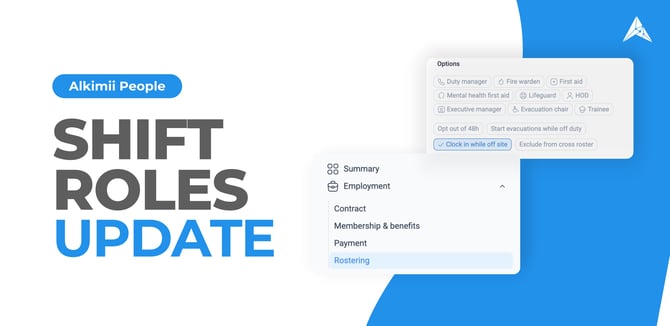
Shift Roles Update
We're excited to announce that Shift Roles has been expanded in Alkimii with two new roles you can assign during rostering!
Your shift roles now go further. You can assign Mental Health First Aider and Evacuation Chair alongside your existing roles, so every key responsibility on a shift is captured in one place.
How it helps
Knowing who holds key safety and wellbeing responsibilities on any given shift matters most when it counts. With these roles built straight into rostering, you can see coverage at a glance and roster with confidence that the right people are in place, all without any separate tracking.
What's new
Mental Health First Aider:
Assign this role to trained employees so wellbeing cover is visible right alongside the rest of your shift roles.
Evacuation Chair:
Assign this role to employees trained to evacuate people using an evacuation chair, so emergency cover is clear on every shift.
Assigned during rostering:
Both roles slot into your existing rostering flow, with no extra steps.
Learn how to assign Shift Roles here.
Need more help?
Email hello@alkimii.com and our Customer Success team will be happy to help.
Product: People
New Course: Alkimii Property: Mobile Essentials
We're excited to announce a new course on the Alkimii Academy: Alkimii Property Mobile Essentials!
This quick-start course gives you a hands-on tour of Alkimii Property on mobile, helping you keep your property operations running smoothly right from your phone. Whether you're brand new to Alkimii or just need a refresher, it covers everything you need to stay on top of things wherever you are on the floor.
How it helps
Your team spends their day on the move, not at a desk. This course gets mobile users confident with the app quickly, so checklists get completed, issues get logged, and nothing slips through the cracks. In just 30 to 35 minutes, they'll have the essentials covered.
What you'll learn
- Checklists with NFC: Scan NFC tags to complete checklists on the spot.
- Maintenance: Log maintenance tasks and proactive checks as you go.
- Shift Notes: Create and navigate shift notes to keep your team informed.
- Lost and Found and Concierge: Report lost and found items and manage concierge requests like packages in and out.
- Visitors and Suppliers: Log supplier visits and manage visitors with ease.
To access the course, click here.
If you haven't registered for the Alkimii Academy yet, it's free, sign up here.
Product: Alkimii Academy
-1.png?width=670&height=327&name=Announcements%20(3)-1.png)
Notice Period Update
We're excited to announce that you can now update and manage notice periods directly from an Employee's Profile in Alkimii!
Keeping notice period information accurate is an important part of employment records, and this update makes it easier than ever to reflect any changes without manual workarounds or outdated data sitting in your system.
How it helps
Whether a notice period has changed as part of a contract update, a promotion, or a change in role, you can now make that update quickly and accurately from within the employee's profile. Having the correct notice period on record ensures clarity for both the employee and the business, and removes any ambiguity if it ever needs to be referenced.
What's new
- Update from the Staff Profile: Notice periods can be updated directly on the employee's Staff Profile under the Other section.
- Range of options: Choose from No Notice, One Week, Two Weeks, Three Weeks, One Month, Two Months and Three Months.
- Instant updates: Changes are reflected immediately, keeping employee records accurate and up to date.
Need more help?
Email hello@alkimii.com and our Customer Success team will be happy to help.
Product: People
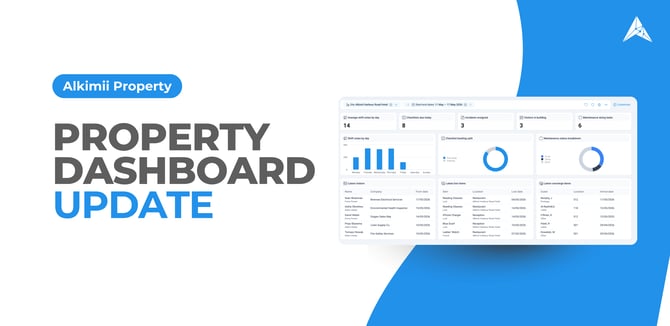 Property Dashboard Update
We're excited to announce that the Property Dashboard has had a major upgrade and is now fully customisable in Alkimii!
Your dashboard is no longer one-size-fits-all. You can now select widgets to build a personalised view, so you see exactly the information that matters to your role on any given day.
How it helps
No two roles are the same, and now your dashboard does not have to be either. Arrange your own snapshot of operations covering everything from incidents and maintenance to visitors and shift notes. See what matters most the moment you log in, all from one screen.
What's new
- Customisable widget selection: Select widgets to build the dashboard that fits the way you work.
- Wide widget choice: Pick from a full range of widgets across incidents, shift notes, checklists, concierge, lost and found, visitors, and maintenance.
- Incidents: Track ambulances, goodwill gestures, unsigned reports, and incident trends over time.
- Shift notes: Monitor notes by day, department, user, and overall volume across any period.
- Checklists: Stay on top of items due today, overdue tasks, and your wider backlog.
- Concierge and Lost and Found: See current items and the latest requests or lost property at a glance.
- Visitors: View who is currently signed in and your most recent visitor entries.
- Maintenance: Check task status, top categories, and an overall maintenance health score.
- Role-based access: You only see the categories and widgets your account has access to.
- Date range filtering: Use the date selector to filter the data shown across all your widgets.
Learn how to navigate the Property Dashboard here (Property Dashboard).
Need more help? .
Email hello@alkimii.com and our Customer Success team will be happy to help.
Product: Property