
This section allows you to add and edit key personal information for your employees, ensuring employee records are complete and accurate.
You'll manage personal details, immigration documents (for non-Irish residents working in Ireland), contact information, address, and passport or driving licence details.You can also set up and manage Alkimii login credentials for staff members. Keeping this information up to date supports accurate payroll processing, compliance requirements, and seamless HR processes.
Important: Personal details cannot be edited whilst there are pending starter packs or requested changes for this section. If the employee needs to complete an outstanding pack, message them on Alkimii chat to remind them to fill it in.
Explore our Quick Links!
- Personal
- Address
- GNIB/IRP (Only applicable for non-Irish residents)
- VISA (UK Specifc)
- Passport - Driver License
- Contact Details - Alkimii Login - Setting Employee Access
- Known By - Moments Sharing
👉 Please note: The employee can update their personal details via the mobile app - click here to learn more.
Personal
This information will usually populate from the information submitted by the employee in their starter pack.
- Citizenship: This refers to the employee's citizenship for employment purposes. This distinction ensures accurate visa requirements are identified for compliance purposes. For example, in Ireland, EU citizens have different right-to-work requirements than non-EU citizens.
- Nationality: The employee's nationality as it appears on their passport.
When you might need to manually update this:
- The starter pack information was incorrect or incomplete
- An employee has gained new citizenship
- Immigration status has changed
Address
This information will usually populate from the information submitted by the employee in their starter pack.
Common scenarios:
- Employee has moved house (impacts payslip delivery, emergency contact accessibility)
- Address was entered incorrectly in the starter pack
- Employee is no longer at a temporary address
💡 Tip: Encourage employees to update this themselves via the mobile app to reduce your admin workload.
GNIB/IRP (Irish immigration card - only for non-Irish residents working in Ireland)
This information typically comes from the details you submitted in your starter pack, but can also be manually entered if needed.
- Visa Stamp Type: Select the current stamp type using the dropdown menu (e.g., Stamp 1, Stamp 4).
Common scenarios:
- You've renewed your immigration permission: Update the new expiry date and card number here.
- Your visa stamp type has changed: Select the new stamp type from the dropdown.
Visa (UK specific only)
This section is only applicable to employees working in the UK who require a visa to work legally. This information typically auto-populates from the details the employee submitted in their starter pack. You can also manually enter or update this information as needed.
- Visa Number: The unique reference number on the employee's visa.
- Visa Type: Select the appropriate visa type using the dropdown menu.
- Visa Date: The expiry date of the employee's current visa.
When you need to update this:
- Employee has renewed their visa - update number, type, and expiry date
- Employee's visa type has changed
- Starter pack information was incorrect
- You're monitoring visa expiry dates for right-to-work compliance
⚠️ Please note: If the employee is using a right-to-work share code instead of physical visa documentation, this can be added in the Contract section of the staff profile - click here to learn more.
Contact Details
This information typically comes from the details added when your profile was created in Alkimii.
Understanding the two email addresses:
- Personal email: Used to contact you (e.g., didn't show up for work).
- Alkimii login email: Used to access the system. Click here to learn more about updating the employee's access level in Alkimii.
These can be different addresses, so don't worry if they don't match. For example, you might use a personal Gmail for contact but log in with a work-specific email.
Identification
This information will usually populate from the information submitted by the employee in their starter pack.
Common scenarios:
- You've renewed your passport: Update the new number and expiry date.
- You've obtained a driving licence: Add this information if the user didn't have one when they started.
Options
Known By
This field allows employees to request a preferred name they'd like to be known by at work. Common examples include:
- Shortened versions of legal names (Alexander → Alex)
- Chosen names that better reflect the employee's identity
- Anglicised versions of names
- Names used socially rather than legally
How it works:
- Employee submits a request with their preferred name (either via mobile app or you can submit on their behalf)
- You review and approve the request as HR Manager
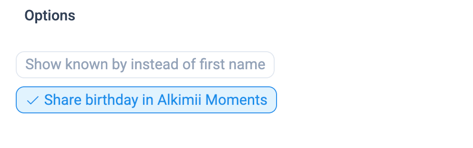
- Enable the "Show known by instead of first name" in this section.
- Once approved, this name appears across Alkimii — including in chat, news, and comments
- This supports inclusive workplace practices and respects employee identity
⚠️ Important: The employee's legal name will still appear on all official reports, payslips, and tax documents in Alkimii to maintain compliance with legal and payroll requirements.
When reviewing requests, consider:
- Whether the name is appropriate for a professional workplace
- If there are any concerns, have a conversation with the employee to understand their request
Birthday Sharing
If you have the Employee Experience subscription, you can enable birthday sharing for individual team members. When enabled, the employee's birthday will be shared through Alkimii Moments, allowing colleagues to send birthday wishes.
How to enable:
- Tick the checkbox next to "Share birthday in Alkimii Moments"
- Employees can also opt in or out themselves via the mobile app
Privacy consideration: Some employees may prefer not to share their birthday - respect this preference and don't enable without checking with them first.
Troubleshooting
"I can't edit personal details - what's blocking me?" Check if there are pending starter packs or requested changes for this employee. Message the employee on Alkimii chat to remind them to complete any outstanding packs, or wait for pending changes to process.
"The starter pack information is incorrect - what do I do?" You can manually update any field directly in this section. The starter pack information simply pre-populates fields; you have full editing access once any pending requests are cleared.