
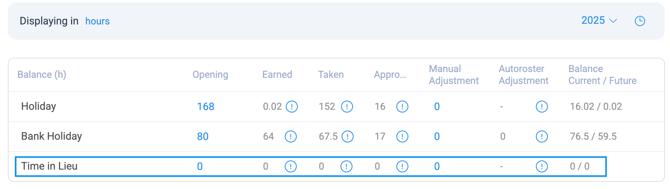
- Opening: This is the sum of the previous year's holiday activity. It populates when the holiday year is cut over.
- Earned: This accrual populates as the payroll weeks are closed. Different contract types accrue annual leave differently.
- Taken: This shows previously taken lieu hours along with future rostered shifts in hours format.
- Approved: This shows approved TOIL hours.
- Manual Adjustments: This is the sum of any changes made to time owed in Lieu. This figure must be entered as a total of all modifications made throughout the year.
- Balance Current/Future: This shows the holiday balance as of now and the current balance net of any future rostered TOIL. It does not calculate future accruals.
History log
To view a history of any adjustments, click on the clock icon in the top right. This audit holds details of manual changes to Lieu balances that have been made. It shows who made the adjustment when it was made and the effect the adjustment had. The user will also have the option to add a note for any adjustment made to provide further context.
This view log option is only available on accountant level access.
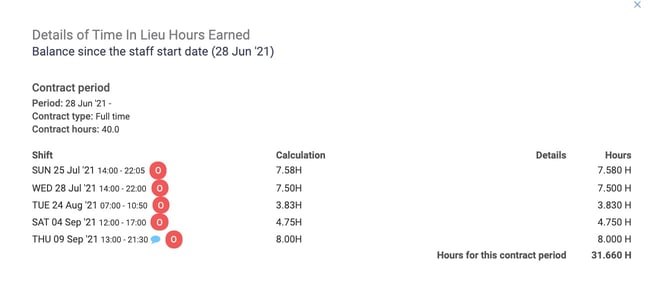
- Information (i) icon will show you the details for Lieu Hours Earned or Taken
- Time Owed in Lieu accrues to the employee's balances either as shifts rostered as TOIL or when the variance is moved into TOIL on the Week Detail screen.
- Rostered TOIL shifts behave like Normal shifts and accrue based on the employee's Clock In/Clock Out.
- If you decide to pay the employee for this time, it is known as Time Paid in Lieu (TPIL)
- Select view log to see a breakdown of these paid shifts
TOIL and TPIL do not calculate for Restricted Hours GNIB/IRP/Visa contract types