
As of the 1st January 2026 in Ireland, all employees aged between 23 and 60, earning more than €20,000 per year and are not activiely paying into a penison will be automatically enrolled into a new pension scheme.
If you want to learn more, check out our blog post 👉 How does Alkimii support with the auto enrolment pension scheme?
If a user has an existing Company Pension set up the option for auto-enrolment won't show.
Otherwise, the system will validate the users birth date and payrate to ensure they meet the criteria for auto-enrolment. If this user meets the criteria, the option for "Auto-Enrolment Pension" will appear in the payment section of the Staff Profile.
⚠️ Please Note: The contribution percentage is Alkimii is purely for costing purposes, this will not impact your payroll export.
How to set up a user for auto enrolment in Alkimii for costing?
To make the process quick and easy, we would advise downloading the Team Details Report so you can identify which users will need the auto-enrolment percentage applied. Once you have your list of users, follow the below steps:- Navigate to the Staff Profiles in Alkimii
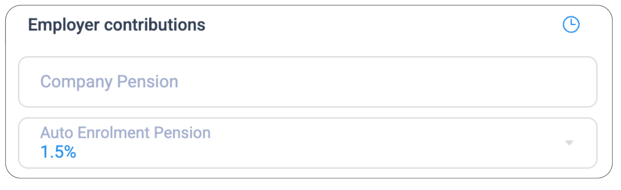
- Open the user's profile and click Employement > Payment > Employer Contributions
- If the user has met the criteria, you will see the option "Auto-enrolment Pension"
- Click on the dropdown menu and select the percentage, per the legislation, this will begin at 1.5%.
⚠️ Please Note: You will not be able to enable the pension percentage until a "Pay Type" has been selected.
- Click "Save" to enable this change.
💡Top Tip: If you have any users with missing birth date information, you can use the AI Compliance option to request this information directly from inside the Staff Profile.
How can I view this on the Revenue Dashboard?
| You will be able to see the costing for pension in the Revenue Dashboard under the Payroll on your forecast, actuals and variance revenue. | 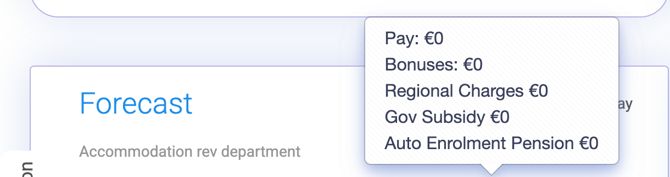 |
What if a user wants to unenrol?
A user can opt out of the auto-enrolment pension scheme within the first 6 months. After 8 months, they will no longer be able to opt out and will only have the option to pause their contributions.
If they decide to unenrol, you can remove this from their Staff Profile in Alkimii so your costing is correctly reflected in the Revenue Dashboard.
- Open the Staff Profile and select the user.
- You will be able to "x" to remove the option.

- Click "Save" to enable the change.
⚠️ Please Note: The user will be automatically re-renroled after 2 years. Once you receive your notification from your NEARSA account, you will need to reenable this percentage in order to see the costing in your revenue dashboard.