Manage Productivity through the Standards tab
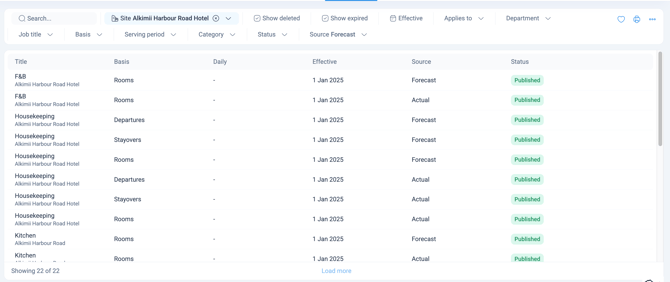
- Here you can see a full breakdown of all standards you have set up.
- Like other areas in Alkimii, this screen includes a search bar and quick filters to help you find specific information efficiently. Along the top, you can filter by Site (for multi-site organisations), toggle Show deleted or Show expired standards on or off, and set an Effective date range. Below that, you can filter by Applies to, Department, Job title, Basis, Serving period, Category, Status, and Source (Forecast or Actual).
- You can create a new standard from this view by clicking Create standard in the top right. For more information, see our Create a Productivity Standard article.
- To the right of each entry, you have a number of actions available. You can edit the standard, view the history log, or soft delete the entry.
⚠️ Please be advised you can't update the category of a standard once this has been set.
Productivity Dashboard
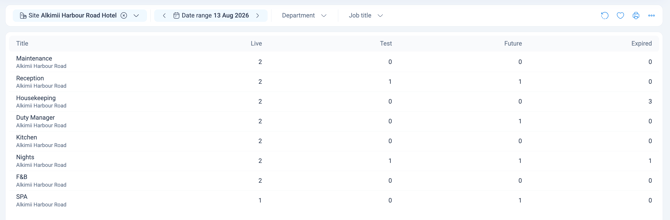
- The Productivity Dashboard shows you how many productivity standards you have, per job title or department, set up across your site or sites.
- At a glance, you can see how many standards are Published (live), Unpublished (in draft), set to start in the Future, or already Expired.
- Like Manage Productivity, this screen includes quick filters, by Site, date range, Department, and Job title.
- Each column shows a running count, not just a total. Click a number within any column to go straight to the standards that make up that count.
- Why it matters: the dashboard is the fastest way to spot gaps at a glance. A high number sitting in Unpublished means standards are still waiting to go live. Keeping an eye on Future and Expired helps you stay ahead of anything that needs reviewing, rather than finding out too late.
Tracking productivity elsewhere
Manage Productivity and the Productivity Dashboard are where you build and maintain your standards, but they're not the only places to keep an eye on them. Once your standards are up and running, you can also track productivity performance:
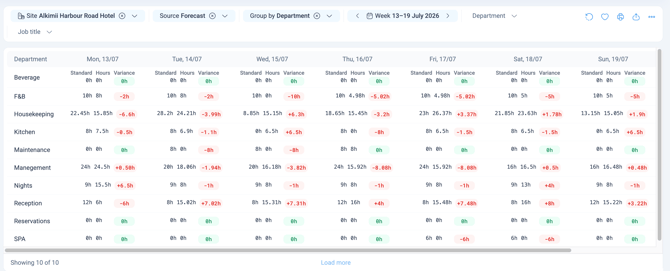
- Day to day, in Roster Analytics, alongside the roster you're building.
- Site-wide, in the Productivity section of the Revenue Dashboard.