
The quick action button allows you to choose your most-used feature as the main button on the mobile app’s navigation bar, with options available based on your system permissions.
Also called ‘quick creation,’ this tool puts your essential tasks, such as creating shift notes, logging maintenance issues, clocking in, and more, front and centre, making it easy to access frequently used actions and keep daily hotel operations running smoothly.
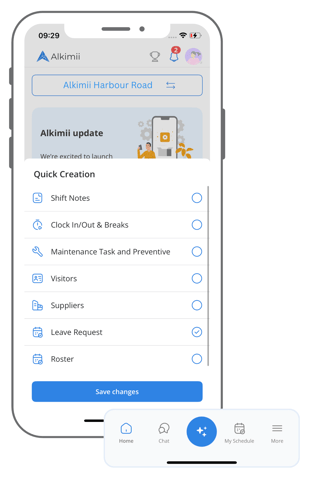
To set up your Quick Create Action Button:
- Open the mobile app
- Hold down on the blue button until the list appears
- Select the most suitable option from the list
From now on, each time you tap this button, your chosen action will be automatically set as the default, letting you access your preferred feature instantly.
To change your Quick Create Action Button:
- Open the mobile app
- Hold down on the blue button until the list appears again
- Update your selection from the list
From now on, each time you tap this button, your new chosen action will be automatically set as the default, letting you access your preferred feature instantly.