
Monitor and manage a team member's pro-rata holiday entitlement directly from their staff profile. When a site is configured to use pro-rata holidays, Alkimii allows you to frontload the full holiday balance at the start of the holiday year, no manual calculation needed.
⚠️ Pro-rata holiday is configured by the Alkimii team during your site setup. Please contact us at hello@alkimii.com if you would like to enable this for your organisation.
Explore our Quick Links!
-
What is pro-rata holidays?
- Making Changes
What are pro-rata holidays?
Pro-rata holiday means a team member receives a proportion of their entitlement based on how much of the holiday year they will work. Unlike standard accruals, the full pro-rated balance is available straight away, making it easier for staff to plan leave from day one.
|
Pro-rata applies to:
|
Pro-rata does not apply to:
|
💡 With standard accruals, holiday builds up gradually as payroll weeks are closed. With pro-rata, the full balance is frontloaded upfront, so what a team member sees on day one is their full entitlement for the year.
Viewing the holiday balance
To access holiday balances, navigate to Staff Profile > Employee > Holiday > Holiday Balances.
You can view holiday balances in hours or days. To switch between the two, click on the text beside "Displaying in" at the top left of the balance table.
To review balances for a specific year, use the year dropdown in the top right corner. You can view:
|
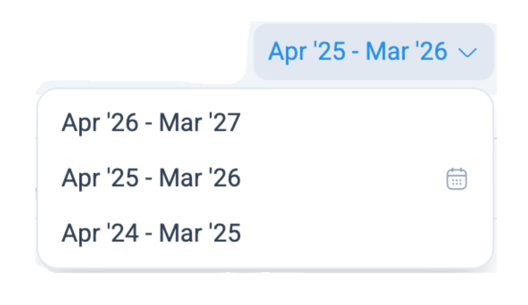 |
💡 Selecting the next holiday year will show a predicted balance based on the team member's existing contract and entitlement, useful for forward planning without deducting anything from the current year's balance.
Understanding the balance columns and entitlement
When you open the Holiday Balances section in a staff profile, you will see a table with several columns.
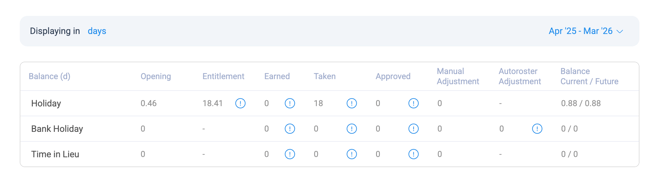
| Column | What it means |
| Opening | Any balance carried forward from the previous holiday year |
| Entitlement | The full pro-rated holiday balance, frontloaded at the start of the holiday year |
| Earned | This will appear blank ( – ) for pro-rata employees. This is expected and is not an error |
| Taken | Holiday already used in this period |
| Approved | Holiday approved but not yet taken |
| Manual Adjustment | Any changes made directly by a manager |
| Autoroster Adjustment | Automatic adjustments made by Alkimii based on roster data |
| Balance Current/Future | Remaining balance now / projected balance once all approved leave is taken |
💡 Click the "!" beside any figure to see a detailed breakdown of how Alkimii calculated that number, including the period, formula, and hours worked.
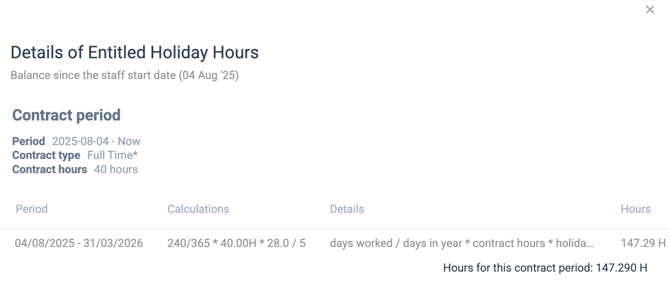
⚠️ For team members on contracted hours, the entitlement breakdown will show a period range only, not specific dates.
New starters and contract changes mid-year
New starters
If a team member joins partway through the holiday year, Alkimii automatically calculates a pro-rated entitlement from their start date. You do not need to calculate this manually.
The balance is worked out based on:
- Their holiday cap
- Their contracted hours
- The number of days remaining in the holiday year from their start date
💡 For example, a team member joining on 1 July with a 28-day cap and 30 contracted hours per week would receive approximately 14.11 days (84.7 hours) for the remainder of the year.
Contract changes mid-year
If a team member moves from a casual or variable-hours contract to a pro-rata contract mid-year:
- Any holiday already earned under the previous contract is held in the Earned balance
- Accruals are switched off from the date of the change
- A new pro-rated Entitlement is calculated using the contract change date as the start date
- The Opening balance is kept separate and treated as carried forward
⚠️ The Entitlement figure for the new pro-rata contract will be calculated in the same way as a mid-year new starter.
Processing a leaver on pro-rata
If a team member on pro-rata leaves partway through the holiday year, Alkimii will automatically calculate their final entitlement based on the number of days worked from the start of the holiday year to their leaving date.
When processing the leaver, one of two outcomes will appear:
If they have taken more holiday than their pro-rated entitlement:
- Alkimii will display a message showing the amount of holiday owed back to the employer
If they have taken less holiday than their pro-rated entitlement:
- Alkimii will display a warning showing the outstanding balance owed to the team member
- You will be asked to confirm before processing
- A shift will be created as normal once confirmed
⚠️ This differs from standard accruals; a pro-rata employee will only be entitled to the balance they have earned up to their leaving date, which may be less than the balance showing on their profile.
Making Changes
Holiday cap and length of service
The holiday cap is the maximum holiday entitlement for a team member, usually expressed in days and inclusive of public holidays. This is visible in the staff profile.
If a team member earns additional holiday days due to length of service, you can update their cap directly in the Holiday Cap field below the balance table. For example, if their cap increases from 28 to 29 days, enter the new figure here.
- Navigate to Staff Profile > Employee > Holiday > Holiday Balances
- Scroll below the balance table to the Custom Holiday Rules section
- Enter the updated figure in the Holiday Cap field
- Click Save to apply
⚠️ The holiday cap will not appear in the entitlement breakdown for team members on contracted hours.
Negative balance warnings
Because the full pro-rata entitlement is frontloaded at the start of the year, there is generally no need for a balance to go below zero.
If a holiday approval would result in a negative balance, Alkimii will do one of the following, depending on how your site is configured:
- Display a warning to alert you before confirming the approval
- Block the approval entirely until the balance issue is resolved
⚠️ These settings are configured during your site setup. Please contact your administrator if you are unsure how this is set for your organisation.
Manual adjustments
If you need to manually adjust a team member's holiday balance, you can do so directly in their Holiday Balances section.
To make a manual adjustment:
- Locate the Manual Adjustment column in the balance table
- Enter the number of hours or days you wish to add or deduct
- This figure can be positive or negative
- You will be prompted to add a mandatory note, this creates a clear record of why the change was made
- Click Save to apply
⚠️ Any changes made to a team member's holiday balance will update immediately on their Alkimii app.