
What are Approval Levels?
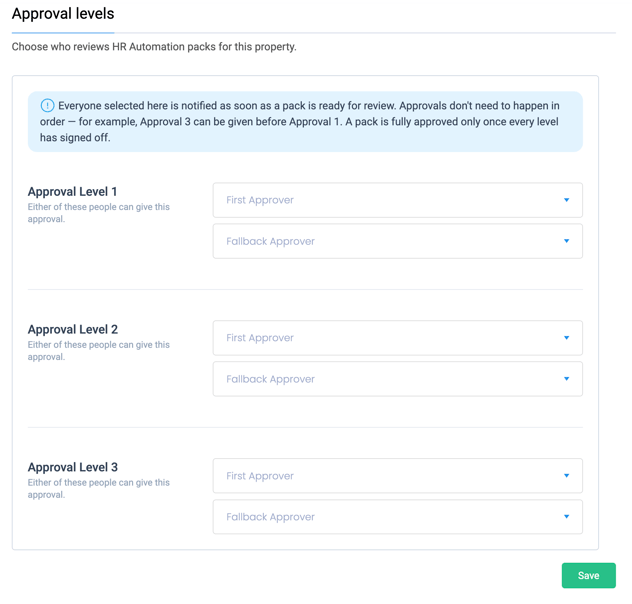
Approval Levels let you choose who reviews HR Automation packs for your property.
You can set up to 3 approval levels. Each level has two people:
- First Approver
- Fallback Approver
Either person can give the approval for that level. The Fallback Approver is useful when the First Approver is on holiday, on a different shift, or away from work.
How approvals work
- Everyone you select is notified as soon as a pack is ready for review.
- Approvals do not need to happen in order. For example, Approval Level 3 can approve before Approval Level 1.
- A pack is fully approved only when every level has signed off.
Example
A hotel sets up its approval levels like this:
- Approval Level 1: Aisha Bello (General Manager). Fallback: Tomasz Nowak (Deputy General Manager)
- Approval Level 2: Priya Sharma (HR Manager). Fallback: Seán Murphy (HR Assistant)
- Approval Level 3: Wei Chen (Finance Manager). Fallback: Maria Santos (Group Accountant)
When a new pack is ready, all six people are notified. The pack is fully approved when one person from each level has signed off.
Before you start
- You need access to App Settings > HR Automation > Approval levels.
- The people you want to select must already be users in Alkimii.
How to set up Approval Levels
Step 1: Open Approval Levels
- Go to App Settings.
- Select HR Automation.
- Select Approval Levels.
Step 2: Choose your approvers
- Go to Approval Level 1.
- Click the First Approver drop-down and select a person.
- Click the Fallback Approver drop-down and select a person.
- Repeat these steps for Approval Level 2 and Approval Level 3.
Step 3: Save your changes
Click Save.
| 💡 Tips |
|