
Before you begin: This feature is not available to all users. If you do not see a portal option in your profile, it has not been configured for your site. Speak to your manager if you are unsure.
In the Alkimii App you can get quick access to your organisation's portal directly from your phone.
Note: The name of your portal may be different depending on how your organisation has set it up. If you are not sure what your portal is used for, speak to your manager.
How to open the portal
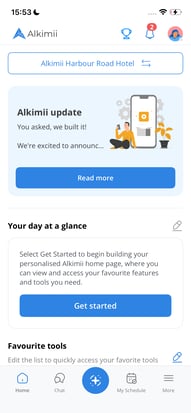
- Open the Alkimii app on your phone.
- Tap your profile picture in the top right corner of the home screen.
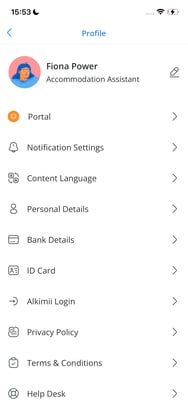
- On the Profile screen, tap Portal (or the name your organisation uses).
- Your portal will open on screen.
 |
|
❓ Need help? If you cannot see a portal option, or if the portal is not working as expected, contact your manager or your organisation's system administrator.