
Building the perfect roster takes time, effort, and careful attention to detail. But what if you could take a roster that's already worked brilliantly and reuse it, without starting from scratch?
That's exactly what the Duplicate Period feature allows you to do.
Explore our quick links below!
Why Duplicate a Period?
There are countless scenarios where duplicating a roster makes sense:
- Seasonal peaks - If you've created a roster that handled the Christmas rush perfectly, why not reuse it for Easter or summer holidays?
- Recurring events - Festival weekends, monthly promotions, or regular community events often have similar staffing needs
- Proven patterns - When you've found a roster that balances footfall, employee availability, and wellbeing, it's worth preserving
Instead of rebuilding these rosters week after week, you can duplicate what's already been tested and refined.
Understanding Your Roster View
Before you start duplicating, it's important to check your current roster view. This determines the period you can duplicate:
- Week view = duplicate one week
- Two-week view = duplicate two weeks
- Month view = duplicate the whole month
Your view setting acts as the framework for duplication, so make sure it matches the period you want to copy.
How to Duplicate a Period?
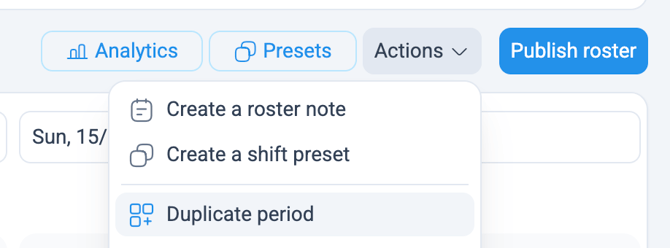
Here's the step-by-step process:
|
 |
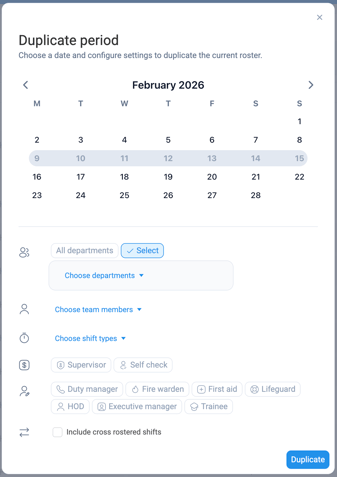
Select specific departments or duplicate across all of them. This is particularly useful in larger organisations where different areas have distinct rostering needs.
If you only want to duplicate rosters for certain employees, perhaps those working consistent patterns or specific roles, you can filter by individual team members.
Choose which shift types to include: normal shifts, training sessions, and more. This means you can duplicate operational shifts without carrying over development days if they're not relevant. |
 |
|
⚠️ Please note: The shift types that can be duplicated are determined by how your site is configured. In most cases, holidays and requested days off are excluded from duplication and will need to be managed separately. |
|
By default, the system copies all shift roles and additional rates. But you can narrow this down to specific roles or rates depending on your requirements, helpful if you're duplicating across different pay structures or responsibilities.
Decide whether to duplicate only home department shifts or include cross-rostered shifts as well. This gives you control over how resources are shared across teams. |
|